|
 |
|
 |
|
| Author |
|
|||||||
|
Zylox
Posts: 1184
Location: Brisbane, Queensland
|
Got a free 360 signing up with Optus Cable for 24months and they finally delivered it after 4 months. I was going to sell it but I've decided to make it a HTPC if i can and free up my theatre rig for another gaming rig. I dont need to play games on it nor want to. I basically want to put VLC on it as I have some mkv's to play. I got 2 1TB HDD's that i'll probably put in a USB JBOD which is the only cost of this endevour (<$100). Where do I start? |
|||||||
| #0 10:07pm 17/11/09 |
|
|||||||
|
system
|
--
|
|||||||
| #0 |
|
|||||||
|
tequila
Posts: 4194
Location: Brisbane, Queensland
|
looks pretty homo erotic for you unfortunately
http://xbmc.org/forum/showthread.php?t=40236 http://www.gadgettastic.com/2007/12/22/cool-mods-the-xbox-360-pc-case/ |
|||||||
| #1 10:30pm 17/11/09 |
|
|||||||
|
Triamks
Posts: 2618
Location: Brisbane, Queensland
|
Yeah, don't think it's possible outside of it being a Media Center Extender.
|
|||||||
| #2 10:43pm 17/11/09 |
|
|||||||
|
Crizane Tribal
Posts: 2805
Location: Brisbane, Queensland
|
We have a proper HTPC in our lounge, but we usually just use the Xbox 360 as it's a bit easier. We don't download MKV's though. I reckon the 360 makes a rad little HTPC for $300.
|
|||||||
| #3 10:44pm 17/11/09 |
|
|||||||
|
Zylox
Posts: 1187
Location: Brisbane, Queensland
|
We don't download MKV's though. I encode MKV off of "free to air" HD channels or from a PVR. No DL's! |
|||||||
| #4 10:50pm 17/11/09 |
|
|||||||
|
Crizane Tribal
Posts: 2807
Location: Brisbane, Queensland
|
*cough* I download legitimate video files from sites like ABC.
|
|||||||
| #5 10:53pm 17/11/09 |
|
|||||||
|
Zylox
Posts: 1189
Location: Brisbane, Queensland
|
damn. I might have to add a bluray drive to the equation.
|
|||||||
| #6 11:23pm 17/11/09 |
|
|||||||
|
giririsss
Posts: 3310
Location: Brisbane, Queensland
|
I don't think you're using it right.
Install something like TVersity, and run a media server on your PC. Then get the xbox to connect to TVersity. Tversity will automatically convert your MKV's into a format that the xbox can play. You don't actually need to mod the 360 at all. |
|||||||
| #7 12:15pm 18/11/09 |
|
|||||||
|
Carson
Posts: 217
Location: Gippsland, Victoria
|
I don't think you're using it right. I've always had problems with getting tversity to convert mkvs. That being said, everything else about tversity is fantastic. |
|||||||
| #8 12:29pm 18/11/09 |
|
|||||||
|
Tollaz0r!
Posts: 10016
Location: Brisbane, Queensland
|
Also, if you are going wireless, buy a DD-WRT supported router.
I bought a $38 ASUS wl-520GC and it worked most excellently. Unfortunately it seems Umart and MSY no longer stock them. I must have brought one of the last 8 Umart had.. |
|||||||
| #9 12:37pm 18/11/09 |
|
|||||||
|
orbitor
Posts: 8059
Location: Brisbane, Queensland
|
Just use GotSENT on your mkv's: http://sentry23.googlepages.com/
It'll make a nice compatible vid file for your 360 without you having to do anything at all besides point it at the file you want converted. |
|||||||
| #10 12:42pm 18/11/09 |
|
|||||||
|
skythra
Posts: 1702
Location: Brisbane, Queensland
|
Get TVERSITY and stream s*** from your PC.
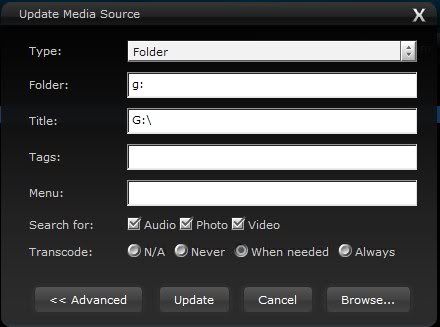
Make sure you have for the folders shared as media to tversity "enable encoding as required" or whatever the setting is. That way MKV's get dubbed into mpeg4 and the subtitles should be on by default. Thats all i use, and its fantastic. But i also play video games on the xbox so you know, i think its worth it for that. Otherwise i'd suggest you sell it for a couple hundred and build a HTPC. I've always had problems with getting tversity to convert mkvs.You're doing something wrong then. Check to make sure you have reencoding enabled on shared folders :P it took me about 2 days to find it. When you add a folder as shared media in the advanced options it has the setting. GL http://i248.photobucket.com/albums/gg195/skythra/Tversitysettings.jpg http://i248.photobucket.com/albums/gg195/skythra/transcodersettings.jpg Just wanted to say this is better than having a second copy of something taking up space, it just transcodes on the fly, to a good format the device likes, and you don't have to plan in advance, you just use your xbox to navigate to the file and press play. No "oh i want to see this TV show, i'll go encode it now and go make dinner and i'll watch it when i get back" its just "I'll watch it so i'll press play". last edited by skythra at 19:39:51 18/Nov/09 |
|||||||
| #11 07:39pm 18/11/09 |
|
|||||||
|
system
|
--
|
|||||||
| #11 |
|
|||||||
|
| ||||||||