|
 |
|
 |
|
| Author |
|
|||||||
|
troyfirex
Posts: 1
Location: Melbourne, Victoria
|
i want to get your opinions. it cost me 1850 custom built Cooling Case Fans: Cooler Master 12cm Rifle Blue LED Cooling CPU: Cooler Master Hyper Z600 Power Supply: Cooler Master Extreme power 600W SLI Mother Board: Gigabyte GA-EP45-DS3, P45=ICH10, FSB 1600MHZ, DDR2 1200, PCI-E x16 2.0 (CrossfireXTM), SATAII, GbN LAN, 1394A, 7.1-channel, ATX. CPU: Intel Core 2 Duo E8500 CPU 3.16Ghz, FSB 1333MHz, 6mb L2 Cache, 45nm, Socket LGA775. GFX: POWERCOLOR ATI HD4870 PCI-E 2.0 512mb 256-bit GDDR5, Memory Clock 1800mhz, Core Clock 750Mhz, FULL HD 1080p Dual DL-DVI & TV(HD CP) RAM: PATRIOT PC2-6400 2GX2 VIPER EPP 4-4-4 Hard Drives: 500BG Seagate 7200RPM SATAII 3GB/S 32MB Cache DVD Drives: Samsung Black 22X DVD+RW, 12X DVD-RAM, 16X +RDL Case: NZXT Tempest Black With Panel BLUE LEDs OS: Vista Premium 64bit |
|||||||
| #0 03:14pm 10/12/08 |
|
|||||||
|
system
|
--
|
|||||||
| #0 |
|
|||||||
|
Pinky
Posts: 127
Location: Melbourne, Victoria
|
Did you get one of those new EGA monitors? 80 lines man, pretty sweet ride. On a serious note, get rid of Vista 64 and replace with Vista 32 and it will be more useful to ya. Luckily you only have 4GB of RAM so that will be ok - you wont be left with useless unused RAM on a 32 bit O/S. |
|||||||
| #1 03:23pm 10/12/08 |
|
|||||||
|
Dodgymon
Posts: 1322
Location: Brisbane, Queensland
|
 * N U K E D *
Reason: Not Relevant |
|||||||
 #2 03:35pm 10/12/08 #2 03:35pm 10/12/08
|
|
|||||||
|
troyfirex
Posts: 2
Location: Melbourne, Victoria
|
Did you get one of those new EGA monitors? 80 lines man, pretty sweet ride. i thought 32bit max was 3 gb? |
|||||||
| #3 03:32pm 10/12/08 |
|
|||||||
|
troyfirex
Posts: 3
Location: Melbourne, Victoria
|
IMO ur a tard for coming on here and making ur first post about gloating you just built a PC. sorry for wanting opinions on if i chose everything right |
|||||||
| #4 03:33pm 10/12/08 |
|
|||||||
|
paveway
Posts: 9026
Location: Brisbane, Queensland
|
haha you must be proud of your video card
|
|||||||
| #5 03:35pm 10/12/08 |
|
|||||||
|
troyfirex
Posts: 4
Location: Melbourne, Victoria
|
haha you must be proud of your video card yeah i am. this is my first really decent rig i have been saving for years sorry for being happy to finally get it. |
|||||||
| #6 03:36pm 10/12/08 |
|
|||||||
|
Twinsen
Posts: 211
Location: Gold Coast, Queensland
|
post back ur FPS on GTA IV, lol.
|
|||||||
| #7 03:37pm 10/12/08 |
|
|||||||
|
troyfirex
Posts: 5
Location: Melbourne, Victoria
|
havnt got the actual rig yet i am picking it up next thursday. but the card gets more then 50 fps on crysis on max. |
|||||||
| #8 03:39pm 10/12/08 |
|
|||||||
|
demon
Posts: 3873
Location: Brisbane, Queensland
|
get a 1tb hdd imo... twice the capacity as the 500gb but it's not twice the price. everything else looks pretty swoit.
|
|||||||
| #9 03:39pm 10/12/08 |
|
|||||||
|
Alt_F4
Posts: 581
Location: Brisbane, Queensland
|
You paid too much.
|
|||||||
| #10 03:42pm 10/12/08 |
|
|||||||
|
troyfirex
Posts: 6
Location: Melbourne, Victoria
|
get a 1tb hdd imo... twice the capacity as the 500gb but it's not twice the price. everything else looks pretty swoit. thanks man yeah i will probably update that later whats partitioning like is it complicated? |
|||||||
| #11 03:43pm 10/12/08 |
|
|||||||
|
troyfirex
Posts: 7
Location: Melbourne, Victoria
|
You paid too much. why so? |
|||||||
| #12 03:44pm 10/12/08 |
|
|||||||
|
Alt_F4
Posts: 582
Location: Brisbane, Queensland
|
why so? Well a few months ago i built my rig with E8500/4GB ram/4850 for about $1000. I realise you have a 4870.. but still. |
|||||||
| #13 03:45pm 10/12/08 |
|
|||||||
|
troyfirex
Posts: 8
Location: Melbourne, Victoria
|
why so?Well a few months ago i built my rig with E8500/4GB ram/4850 for about $1000. I realise you have a 4870.. but still. i felt like a got a good price but thanks for you input |
|||||||
| #14 03:48pm 10/12/08 |
|
|||||||
|
demon
Posts: 3874
Location: Brisbane, Queensland
|
it's prolly the cooling stuff thats bumping the price up. partitioning is really easy. you get the option at the very beginning of windows setup to set up the partitions, just follow the prompts.
|
|||||||
| #15 03:56pm 10/12/08 |
|
|||||||
|
troyfirex
Posts: 9
Location: Melbourne, Victoria
|
it's prolly the cooling stuff thats bumping the price up. partitioning is really easy. you get the option at the very beginning of windows setup to set up the partitions, just follow the prompts. so it would be a good idea to have both 32 bit and 64 bit OSs? |
|||||||
| #16 04:02pm 10/12/08 |
|
|||||||
|
Spook
Posts: 23634
Location: Brisbane, Queensland
|
must resist urge to post pixture of truck
|
|||||||
| #17 04:04pm 10/12/08 |
|
|||||||
|
Sc00bs
Posts: 3379
Location: Brisbane, Queensland
|
no
|
|||||||
| #18 04:05pm 10/12/08 |
|
|||||||
|
paveway
Posts: 9027
Location: Brisbane, Queensland
|
* N U K E D *
Reason: Abusive |
|||||||
|
#19 04:08pm 10/12/08
|
|
|||||||
|
parabol
Posts: 5001
Location: Brisbane, Queensland
|
i thought 32bit max was 3 gb? That's roughly right. With both XP and Vista 32-bit, I was limited to 2.93GB out of the 4GB. Though I wouldn't go for 64-bit to utilise that remaining 1GB, not worth the hassle unless you genuinely need that memory. |
|||||||
| #20 04:08pm 10/12/08 |
|
|||||||
|
d0mino
Posts: 3720
Location: Brisbane, Queensland
|
hey troyfirex, your sig is lame considering you don't even have the machine yet.
/opinion |
|||||||
| #21 04:11pm 10/12/08 |
|
|||||||
|
rubba-chikin
Posts: 6190
Location: Brisbane, Queensland
|
Why is it not worth the hassle...
I have been running 64bit since the release... as long as you have new gen hardware (which he does) and don't try to run obscure 10 year old software he won't have a problem and will get full usage of his RAM. From the looks of the PC its a gaming machine and vista64 will run everything fine. |
|||||||
| #22 04:15pm 10/12/08 |
|
|||||||
|
Alt_F4
Posts: 583
Location: Brisbane, Queensland
|
Yeah rubba, pretty sure everyone who be dissin' on 64 bit vista hasn't actually tried it themselves.
I have had no problems at all with it. No hardware driver issues or anything of the sort. That said, i haven't tried running any older apps/games (apart from Quake 3 and Starcraft, both which worked fine). |
|||||||
| #23 04:19pm 10/12/08 |
|
|||||||
|
TicMan
Posts: 3964
Location: Melbourne, Victoria
|
Seems like money well spent........
INTEL 965 EXPRESS CHIPSET USER |
|||||||
| #24 04:20pm 10/12/08 |
|
|||||||
|
DecayingCorpse
Posts: 1613
Location: Brisbane, Queensland
|
* N U K E D *
Reason: Abusive |
|||||||
|
#25 04:22pm 10/12/08
|
|
|||||||
|
parabol
Posts: 5003
Location: Brisbane, Queensland
|
pretty sure everyone who be dissin' on 64 bit vista hasn't actually tried it themselves. I had it installed for a few days before giving it a format, so there goes your argument. Doesn't take much to get the vista crowd worked up. Such a defensive bunch, bringing in the tiring old-hardware/you-haven't-tried-it/noob arguments as predictably as ever when someone cites their honest bad experience with the OS. last edited by parabol at 16:33:41 10/Dec/08 |
|||||||
| #26 04:33pm 10/12/08 |
|
|||||||
|
troyfirex
Posts: 10
Location: Melbourne, Victoria
|
the only old sofware/hardware i will be using on the pc is maybe my 3 year old network card which will be updated very soon. i went on the microsoft website and they said it will be compatible with 64bit after a driver update. and even if i wanted to run a piece of old software that wont work on 64 bit i always have my current s***box. |
|||||||
| #27 04:29pm 10/12/08 |
|
|||||||
|
Spook
Posts: 23635
Location: Brisbane, Queensland
|
wouldnt you be using your onboard gigalan for networking?
|
|||||||
| #28 04:33pm 10/12/08 |
|
|||||||
|
parabol
Posts: 5004
Location: Brisbane, Queensland
|
wouldnt you be using your onboard gigalan for networking? I agree, there are two Gb LAN ports on that mobo! Can't really see why anyone would use a PCI slot unless they need an ethernet card with specific features. |
|||||||
| #29 04:36pm 10/12/08 |
|
|||||||
|
Alt_F4
Posts: 584
Location: Brisbane, Queensland
|
Well you didn't actually say why it is bad or that you had trouble with it, you just said it sucks. I, on the other hand, was merely stating that myself and countless others running new setups like the OP's have not had any problems. |
|||||||
| #30 04:40pm 10/12/08 |
|
|||||||
|
troyfirex
Posts: 11
Location: Melbourne, Victoria
|
i got told that my router will only recognize the card i am currently using because its through a telstra router and it is secured to that card? |
|||||||
| #31 04:40pm 10/12/08 |
|
|||||||
|
Spook
Posts: 23636
Location: Brisbane, Queensland
|
lolololol
|
|||||||
| #32 04:41pm 10/12/08 |
|
|||||||
|
Jim
Posts: 8938
Location: Brisbane, Queensland
|
||||||||
| #33 04:42pm 10/12/08 |
|
|||||||
|
TicMan
Posts: 3965
Location: Melbourne, Victoria
|
I approve of your CPU usage Jim.
|
|||||||
| #34 04:57pm 10/12/08 |
|
|||||||
|
rubba-chikin
Posts: 6191
Location: Brisbane, Queensland
|
The only problems I have had with Vista 64 incompatibility was with a cheapass canon printer that had no 64 bit driver.
It has since stopped working altogether so that problem kinda resolved itself. And trying to run an older SBLive 5.1 - but you can refer to my previous post, this thing is f***ing old |
|||||||
| #35 05:07pm 10/12/08 |
|
|||||||
|
mongie
Posts: 5793
Location: Brisbane, Queensland
|
There is nothing wrong with Vista 64, but I dont' use it because my TV Card manufacturer (DVICO) are unable to make a working 64bit driver.
Well, they weren't able to 6 months ago anyway. |
|||||||
| #36 05:13pm 10/12/08 |
|
|||||||
|
ara
Posts: 2376
Location: Sydney, New South Wales
|
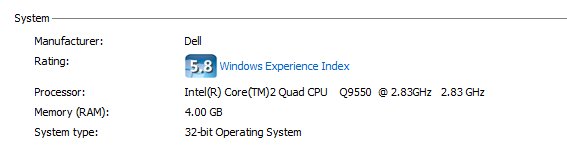
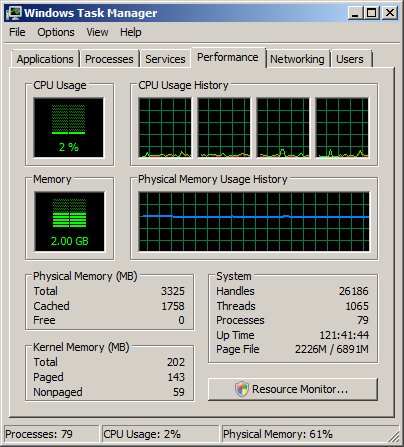
haha, jim. only 32bits. haha. i have double your bits!
http://dingo.net.au/bits.jpg http://dingo.net.au/taskman.jpg last edited by ara at 17:21:23 10/Dec/08 |
|||||||
| #37 05:21pm 10/12/08 |
|
|||||||
|
Jim
Posts: 8939
Location: Brisbane, Queensland
|
it's not how many bits you have, it's what you do with them :(
|
|||||||
| #38 05:25pm 10/12/08 |
|
|||||||
|
CeMaX
Posts: 424
Location: Brisbane, Queensland
|
I'm with rubba. Vista64 has been great for me.
Intel Quad Q9400 @ 3.0Ghz Asus P5Q3 Deluxe WiFi 4GB OCZ DDR3 Gigabyte GTX280 1GB DDR Dell 30" |
|||||||
| #39 05:26pm 10/12/08 |
|
|||||||
|
ara
Posts: 2377
Location: Sydney, New South Wales
|
yeah same, i haven't had any issues with 64bit windows vista. |
|||||||
| #40 05:27pm 10/12/08 |
|
|||||||
|
eighty-eight
Posts: 958
Location: Brisbane, Queensland
|
nice system dude, only thing that I would change, would be a quad core CPU.
*take the bait* |
|||||||
| #41 05:31pm 10/12/08 |
|
|||||||
|
3dee
Posts: 2824
Location: Brisbane, Queensland
|
I've only ever ran 64-bit Vista and it worked fine. Its 64-bit XP which apparently is kinda bad.
|
|||||||
| #42 05:38pm 10/12/08 |
|
|||||||
|
Tollaz0r!
Posts: 9337
Location: Brisbane, Queensland
|
You see, 64-bit Vista is crap, and 32 bit Vista is crap. So your comparing crap with crap. |
|||||||
| #43 05:50pm 10/12/08 |
|
|||||||
|
demon
Posts: 3875
Location: Brisbane, Queensland
|
i'd use vista if it was a free upgrade from xp. but pay ~$250 for an oem copy that's locked to one machine... that's bollux! bollux i tells yas!@#! i'll keep using my trusty xp-pro that i can install on any machine till something convinces me it's actually worthwhile changing to vista. (or wotevas next).
|
|||||||
| #44 05:52pm 10/12/08 |
|
|||||||
|
Jim
Posts: 8940
Location: Brisbane, Queensland
|
vista makes sharing precious moments with friend and family so much easier, while maximising productivity at no cost to your thinestic muldwarts
|
|||||||
| #45 06:00pm 10/12/08 |
|
|||||||
|
3dee
Posts: 2825
Location: Brisbane, Queensland
|
You see, 64-bit Vista is crap, and 32 bit Vista is crap. So your comparing crap with crap. Actually I never had one problem with Vista. And I'd sure as hell use it over XP. But then again, I'd rather use Mac OSX over Windows but that's another story. |
|||||||
| #46 06:06pm 10/12/08 |
|
|||||||
|
troyfirex
Posts: 12
Location: Melbourne, Victoria
|
nobody answered my question. will the GbN LAN work with my telestra broadband router? |
|||||||
| #47 06:16pm 10/12/08 |
|
|||||||
|
Jim
Posts: 8941
Location: Brisbane, Queensland
|
check the manufacturer's website to see if it's also 10/100mbit. chances are it is
|
|||||||
| #48 06:19pm 10/12/08 |
|
|||||||
|
Pinky
Posts: 129
Location: Melbourne, Victoria
|
I'm a Vista fan (over XP) but I used 64 for 6 months and reformatted and put 32 back on. Ok, if you're a straight-up game user who doesn't do anything - fine, you won't notice any problems. However, if you want to set up anything close to a typical OSS dev env then forget it. Unsigned driver support is non-existant without really annoying hacks. Last time I tried to set up Code::Blocks/GCC/GDB env, impossible. Apps like PeerGuardian2 - forget trying to even think about running them. Microsoft wants money to sign software/hardware drivers, which means it's pretty much a no-go for a lot of freeware/OSS apps except ones like CutePDF where they have commercial support. If you are using anything other than mainstream apps, totally forget about messing with Vista 64. Someone who's not a numerical mathematician or engineer give me a good reason for a home user to run a 64 bit O/S - I can't think of any. |
|||||||
| #49 07:10pm 10/12/08 |
|
|||||||
|
shad
Posts: 2473
Location: Brisbane, Queensland
|
will the GbN LAN work with my telstra broadband router? Should be fine. The card will just lower its speed to whatever the max is on the router. No idea what they mean by locking. I don't know any telstra routers that lock via MAC's on ethernet. |
|||||||
| #50 07:23pm 10/12/08 |
|
|||||||
|
Crizane Tribal
Posts: 2399
Location: Brisbane, Queensland
|
i thought 32bit max was 3 gb? We've been through this eleventy billion times on here! Windows XP and other 32 bit flavours of windows can only address 4gb of total memory. SO that includes your graphics card(s) etc. Depending on your video ram and motherboard, you could be able to use up to 3.5GB or 3.75GB of your RAM (i think this requires some sort of mod or tweaking). Alright system. I would have waited till January next year. The release of AM3 might have pushed down the prices of the new Intel i7's. |
|||||||
| #51 08:18pm 10/12/08 |
|
|||||||
|
Obes
Posts: 6918
Location: Brisbane, Queensland
|
You can actually turn off driver signing install whatever then it auto re-enables next reboot. Found out off the rivatuner forums with the rivatuner drivers.
|
|||||||
| #52 09:48pm 10/12/08 |
|
|||||||
|
step
Posts: 1643
Location: Brisbane, Queensland
|
What on earth are you running ara? 98 processes... I cringe when I'm over 40.
Apps like PeerGuardian2 - forget trying to even think about running them.Um, guess you haven't even looked at their forums? PG2 RC1 Test 2 has been running pretty well for the majority (some effort is needed), even works on Windows 7 too. Anyways, Server 2008 is where it's at. last edited by step at 22:17:45 10/Dec/08 |
|||||||
| #53 10:17pm 10/12/08 |
|
|||||||
|
Jim
Posts: 8942
Location: Brisbane, Queensland
|
work machine, always have a s***eload of things running
|
|||||||
| #54 10:30pm 10/12/08 |
|
|||||||
|
Strik3r
Posts: 1550
Location: Gold Coast, Queensland
|
Its 64-bit XP which apparently is kinda bad. one Xp x64 user right here happy as a pig in mud. Its fast, stable and gives me access to all 4gb. Also run xp64 on all of our image processing PC's in the lab... including our newest - dual quad core (8 cores), 16gb ram, quatro 5700. The only issue we had so far is purchasing a cheap netgear wireless usb dongle to find that netgear dont have 64bit drivers. Easy fix though.. return the module and get a dlink one :P |
|||||||
| #55 11:04pm 10/12/08 |
|
|||||||
|
eXemplar
Posts: 2200
Location:
|
Just because your operation system is 64 bit doesn't mean all your 32 bit applications magically become 64 bit.
|
|||||||
| #56 12:22am 11/12/08 |
|
|||||||
|
koopz
Posts: 7265
Location: Brisbane, Queensland
|
pretty sure everyone who be dissin' on 64 bit vista hasn't actually tried it themselves. I'm pretty happy atm cleaning up messes caused by people who thought that rolling out brand new tech without sandboxing it thoroughly wouldn't hurt their career in the short term. get it for a gaming machine if you're keen to experiment, but roll it out all over the country thinking you know better than your older and more experienced peers have tried to tell you? are you on drugs? |
|||||||
| #57 02:14am 11/12/08 |
|
|||||||
|
Alt_F4
Posts: 589
Location: Brisbane, Queensland
|
Well as i said koopz, my opinion was just based on my experience with my PC which is of similar specs.
|
|||||||
| #58 02:37am 11/12/08 |
|
|||||||
|
`ViPER`
Posts: 682
Location: Brisbane, Queensland
|
Unless you have over 4gb of ram, 64bit is pretty pointless, all the extra isues you will have arent worth it. Before you say "I run 64bit os and have no problems", it might be true for you, but I have setup 64bit machines for clients and they are definitly more pain than its worth.
None existent drivers for random devices is the main problem. You might not have a problem for ages, then you go a buy some hardware device only to find out it doesnt have 64bit drivers, or the 64bit drivers are just crap. |
|||||||
| #59 08:38am 11/12/08 |
|
|||||||
|
Thundercracker
Posts: 1833
Location: Brisbane, Queensland
|
I run 64bit os and have no problems
...but I also have pretty new hardware and the driver support has been really good. I actually am surprised at how well my machine has been running since I got it, I was expecting at least some hassle (vista 64bit ftw). edit: my older machine runs XP and I am most certainly not upgrading it in a hurry last edited by Thundercracker at 10:13:22 11/Dec/08 |
|||||||
| #60 10:13am 11/12/08 |
|
|||||||
|
Pinky
Posts: 132
Location: Melbourne, Victoria
|
Apps like PeerGuardian2 - forget trying to even think about running them.Um, guess you haven't even looked at their forums? PG2 RC1 Test 2 has been running pretty well for the majority (some effort is needed), even works on Windows 7 too. I tried a week to get PG2 RC1 running and I'm more or less a software engineer by trade. Only way I managed to get it going was as one person said above to disable driver signing (which is then re-enabled, which makes it useless). It's a no go. Be my guest and try it. As far as the whole RAM issue goes I bought 8GB. Installed Vista 32 bit (recognising 4GB RAM), 3DMark06 score was 12880. Put on Vista 64 bit (recognising 8GB RAM), 3DMark06 score was 12960. Bugger all difference. Although, 3DMark06 not really suitable for testing 64 bit setup - it's very difficult to compare in reality, but in my opinion the extra 4GB of RAM is useless unless you want to set-up Virtual Machines or something like that - which most people don't. |
|||||||
| #61 10:23am 11/12/08 |
|
|||||||
|
tequila
Posts: 412
Location: Brisbane, Queensland
|
G.Skill DDR2 4G (2G x 2) PC2-8500 1066 PI 5-5-5-15 $145.00
Intel CORE 2 QUAD Q9550/2.83GHz/12MB CACHE/1333MHz FSB/LGA775 $495.00 Asus P5QL-E ExpGATE S775 P43 DDR2 FSB1600 PCIE RAID GBLAN 1394 ATX $159.00 Total $799.00 Y/N ? |
|||||||
| #62 10:52am 11/12/08 |
|
|||||||
|
parabol
Posts: 5006
Location: Brisbane, Queensland
|
Although, 3DMark06 not really suitable for testing 64 bit setup The 64-bit part has nothing to do with it, it's just that 3DMark doesn't use that much memory. So you won't really see the difference between 4GB and 8GB using that benchmarking tool since the 4GB wasn't bottle-necking you in the first place. but in my opinion the extra 4GB of RAM is useless unless you want to set-up Virtual Machines or something like that Pretty much. |
|||||||
| #63 10:57am 11/12/08 |
|
|||||||
|
Alt_F4
Posts: 590
Location: Brisbane, Queensland
|
but in my opinion the extra 4GB of RAM is useless unless you want to set-up Virtual Machines or something like that Yeah that's true but its not like you have to break the bank to get it. |
|||||||
| #64 11:19am 11/12/08 |
|
|||||||
|
rubba-chikin
Posts: 6192
Location: Brisbane, Queensland
|
What is the system for Teq?
Gaming - forget the quad and get an e8*** series core2 If you do a bunch of ripping/encoding then the quad will be worth it |
|||||||
| #65 11:23am 11/12/08 |
|
|||||||
|
tequila
Posts: 413
Location: Brisbane, Queensland
|
yeah its for gaming & software dev / multipurpose
|
|||||||
| #66 11:24am 11/12/08 |
|
|||||||
|
rubba-chikin
Posts: 6193
Location: Brisbane, Queensland
|
Unless you are doing video encoding etc then the pricetag of the quad is probabaly not going to be justified with the performance you'll get from it.
The core2s outperform the quads for gaming and are cheaper so they would be a better choice imo, its your money though :) |
|||||||
| #67 12:25pm 11/12/08 |
|
|||||||
|
parabol
Posts: 5009
Location: Brisbane, Queensland
|
The core2s outperform the quads for gaming I'd go further and say the dual-cores outperform similarly priced quads for most applications and not just gaming, since even very few multi-core programs can utilise more than 2 cores efficiently. A handful of well-programmed video/image/audio programs will benefit but there really aren't many, you're better off with two faster-clocked cores. (btw "Core 2" doesn't mean dual-core, it refers to both dual and quad core models!) last edited by parabol at 12:55:17 11/Dec/08 |
|||||||
| #68 12:55pm 11/12/08 |
|
|||||||
|
tequila
Posts: 416
Location: Brisbane, Queensland
|
fair call
Intel ATX E8500 CORE 2 DUO/3.16GHz/6MB/1333FSB/LGA775 $289.00 G.Skill DDR2 4G (2G x 2) PC2-8500 1066 PI 5-5-5-15 $145.00 Asus P5Q P45 M/B $175.00 Total $609.00 edit: + Gigabyte GF9800GTX+1GB GDDR3740Mhz PCIE2.0 2xDVI HDTV HDCP HDMI ATX Internet Price: $319.00 Y/N ? last edited by tequila at 13:39:55 11/Dec/08 |
|||||||
| #69 01:39pm 11/12/08 |
|
|||||||
|
Alt_F4
Posts: 593
Location: Brisbane, Queensland
|
Most people will tell you to forget the nvidia card and get a 4850 or 4870, both are better value.
|
|||||||
| #70 01:48pm 11/12/08 |
|
|||||||
|
tequila
Posts: 417
Location: Brisbane, Queensland
|
rad
so this is what I've come up with; Intel ATX E8500 CORE 2 DUO/3.16GHz/6MB/1333FSB/LGA775 $289.00 G.Skill DDR2 4G (2G x 2) PC2-8500 1066 PI 5-5-5-15 $145.00 Asus P5Q P45 M/B $175.00 Asus EAH4850 1G DDR3 PCIE2.0 DVI HDTV $319.00 BenQ E2400HD 24 inch 2ms Full HD Widescreen LCD Monitor $365.00 Total $1293.00 |
|||||||
| #71 01:55pm 11/12/08 |
|
|||||||
|
Alt_F4
Posts: 595
Location: Brisbane, Queensland
|
Looks pretty good, it might be worth going up to a 4870 if you can spare an extra $100 or so.
|
|||||||
| #72 01:59pm 11/12/08 |
|
|||||||
|
tequila
Posts: 418
Location: Brisbane, Queensland
|
I'm going to wait till after boxing day to buy it, maybe mid january if its going to make that much of a difference
i'll revise it all then, might be able to bump a few things up spec' without adding to the price too much |
|||||||
| #73 02:02pm 11/12/08 |
|
|||||||
|
parabol
Posts: 5013
Location: Brisbane, Queensland
|
Lol wrong post in wrong tab/thread.
EDIT: You can wait around forever to save a few bucks, but you're without a system for that time. |
|||||||
| #74 02:13pm 11/12/08 |
|
|||||||
|
tequila
Posts: 419
Location: Brisbane, Queensland
|
I've got a laptop and an existing core2 2ghz box at home for the meantime
|
|||||||
| #75 02:16pm 11/12/08 |
|
|||||||
|
parabol
Posts: 5014
Location: Brisbane, Queensland
|
I meant a system for the purposes that you're buying for.
There's always new/cheaper tech around the corner .. always :) |
|||||||
| #76 02:19pm 11/12/08 |
|
|||||||
|
tequila
Posts: 420
Location: Brisbane, Queensland
|
true, but I only decided to buy it yesterday because;
a) my gf bought COD4 for me b) I put a hole in my 12 month old dell 24" trying to fix the current core2 and c) because its christmas time and I haven't bought myself a present yet |
|||||||
| #77 02:52pm 11/12/08 |
|
|||||||
|
Pinky
Posts: 137
Location: Melbourne, Victoria
|
There's always new/cheaper tech around the corner .. always :) I've always found the longer you can wait, the better (financially). As long as you aren't spending money, you're doing alright. So give yourself reasons. I'm waiting for BTX PSUs... Hehe. |
|||||||
| #78 03:04pm 11/12/08 |
|
|||||||
|
Alt_F4
Posts: 598
Location: Brisbane, Queensland
|
Not necessarily. I built my new computer about 3.5 months ago, it cost me $1001 (box only: E8500/case/4GB ram/4850 etc). If i was to build the same or a similar system now, it would probably cost me $100-150 more. |
|||||||
| #79 03:30pm 11/12/08 |
|
|||||||
|
rubba-chikin
Posts: 6194
Location: Brisbane, Queensland
|
btw "Core 2" doesn't mean dual-core, it refers to both dual and quad core models! My bad, I am aware the core2 range encompasses the quads as well just wrote the wrong thing. I've always found the longer you can wait, the better (financially). As long as you aren't spending money, you're doing alright. So give yourself reasons. Best rule of thumb is to avoid buying the highest ranked piece of hardware. They always depreciate a f***load quickly and you don't really gain a whole lot more performance by having them. eg. take a look at the new core i7 quad cpus Intel Core i7 920 Processor LGA1366 2.66GHz 8MB Cache CPU $499.00 Intel Core i7 940 Processor LGA1366 2.93GHz 8MB Cache CPU $999.00 Same cores, same cache, you get 0.27 more Ghz for $500 extra?.. you'll be kickin urself in the nuts when the next cpu release hits and it halves in price. Is that really going to offer a whole lot more performance? $500 worth of performance... highly unlikely. |
|||||||
| #80 04:43pm 11/12/08 |
|
|||||||
|
step
Posts: 1645
Location: Brisbane, Queensland
|
I tried a week to get PG2 RC1 running and I'm more or less a software engineer by trade.How did you miss this post then? It's really not that hard to setup and get working, plus there are guys there that will help if you're truly in a bind. |
|||||||
| #81 08:41pm 11/12/08 |
|
|||||||
|
tequila
Posts: 427
Location: Brisbane, Queensland
|
firewalls belong on the modem/router etc
|
|||||||
| #82 09:05pm 11/12/08 |
|
|||||||
|
Jim
Posts: 8949
Location: Brisbane, Queensland
|
false
|
|||||||
| #83 11:02pm 11/12/08 |
|
|||||||
|
parabol
Posts: 5015
Location: Brisbane, Queensland
|
How did you miss this post then? Wow and I thought some linux tutorials were hacky! |
|||||||
| #84 11:21pm 11/12/08 |
|
|||||||
|
system
|
--
|
|||||||
| #84 |
|
|||||||
|
| ||||||||