|
 |
|
 |
|
| Author |
|
|||||||
|
Term
Posts: 4479
Location: Queensland
|
Planning a move to SSD with iSCSI for my big stuff, wondering what others are doing with large files. I did some testing at the office and I thought I'd share it here so u guys can see how much normal drives suck arse http://adam.qgl.org/iscsi/iscsi.htm Jim has some other stats on the SSD which are pretty cool using the same thing. |
|||||||
| #0 02:28pm 27/05/09 |
|
|||||||
|
system
|
--
|
|||||||
| #0 |
|
|||||||
|
stinky
Posts: 3160
Location: USA
|
what are you using to host the iSCSI ?
|
|||||||
| #1 03:05pm 27/05/09 |
|
|||||||
|
Jim
Posts: 9718
Location: Brisbane, Queensland
|
the same test on that little ocz vertex I nabbed yesterday:
http://jason.qgl.org/images/HDTune_File_Benchmark_OCZ-VERTEX_v1.10.png |
|||||||
| #2 03:06pm 27/05/09 |
|
|||||||
|
Jim
Posts: 9719
Location: Brisbane, Queensland
|
what are you using to host the iSCSI ?the iscsi lun is just a 30gb flatfile sitting on an ext3 partition using iet for the target the hardware is a HP DL380 G5 with dual quad core xeon @ 2.33GHz (E5345) and 4gb ram, running centos. and the most important part of the hardware are the disks+controller where the iscsi target is being served from - 4 x 146gb 10k rpm sas drives in raid5 on a P800 controller which has 512mb of battery backed cache so it's a fairly decent piece of hardware all round, particularly in the disk i/o department, but by no means the best you could use. and it's not configured specifically for iscsi either - it has another role here in the office, it's just the one I happened to pick cos it had a decent controller and plenty of free space |
|||||||
| #3 03:21pm 27/05/09 |
|
|||||||
|
HeardY
Gaelic newb
Posts: 16135
Location: Ireland
|
There is some massive differences there!
SSD for boot drive for the win!! |
|||||||
| #4 07:01pm 27/05/09 |
|
|||||||
|
TicMan
Posts: 4644
Location: Melbourne, Victoria
|
I just put in a RAID1+0 with SAS 15k RPM drives for our DB server, might run some tests on it tomorrow before cutting it into production.
|
|||||||
| #5 07:18pm 27/05/09 |
|
|||||||
|
`ViPER`
Posts: 1134
Location: Brisbane, Queensland
|
Thats decent performance from the ISCSI, from all ive read, the best you will get is 120-160mb a sec.
but, those drives natively on that server would be way faster than 100mb a sec, ive tested with the same server and get over 300mb a sec from SAS drives in a raid mirror, the iscsi is limiting it to about 100mb a sec. It is a bit of a waste of fast drives though, I can get 100-105 mb from a hardware iscsi unit using only sata drives in the it. The raid setup of the unit didnt seem to make much difference, i got about the same speed from raid 5 and raid 10, you hit the limit of iscsi pretty easily. Also, the unit I was setting up had 802.3 (LACP) link aggregation over 1gb ethernet connections, with LACP setup on a HP switch, but in a performance test, it wont ever use both links becuase one stream of data will only ever go over 1 link. When the device is being accessed from multiple sources as it would in a real life setup, the link aggregation makes a big difference. ISCSI is awesome though, and unless you need realy fast disk performance, it works great. I've setup a vmware esx server using just iscsi for storage, and it worked great. You'd want to go fibre channel though if you want realy fast performance. |
|||||||
| #6 08:06pm 27/05/09 |
|
|||||||
|
jmr
Posts: 6250
Location: Brisbane, Queensland
|
Yeah I have one of my sites on a Perc6 w 6 x 300GB SAS 15K drives in Raid10
f***ing owns |
|||||||
| #7 08:29pm 27/05/09 |
|
|||||||
|
Jim
Posts: 9724
Location: Brisbane, Queensland
|
etherchannel bonding would've let a single data transfer go over both nics viper
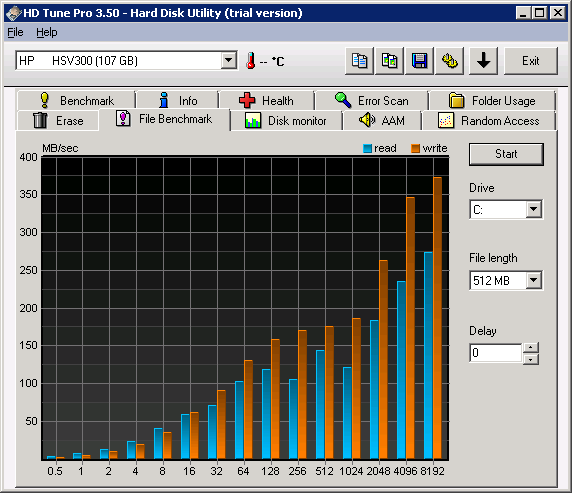
also here's a hdtune test on a hp eva 4400 vraid 5 lun for s***s and giggles: http://jason.qgl.org/images/HDTune_File_Benchmark_HP______HSV300.png |
|||||||
| #8 09:56pm 27/05/09 |
|
|||||||
|
Jim
Posts: 9725
Location: Brisbane, Queensland
|
also what are you referring to when you say iscsi limit viper? term's tests there are nearly maxing our gbit connection, that's not an iscsi limitation
|
|||||||
| #9 10:21pm 27/05/09 |
|
|||||||
|
`ViPER`
Posts: 1135
Location: Brisbane, Queensland
|
etherchannel bonding would've let a single data transfer go over both nics viper Realy? everywhere I read says that even with link aggregation it only ever uses one physical nic per transfer. also what are you referring to when you say iscsi limit viper? term's tests there are nearly maxing our gbit connection, that's not an iscsi limitation Yeah thats what i meant, its not an iscsi limitation, more of a limit of 1gb ethernet iscsi. |
|||||||
| #10 11:22pm 27/05/09 |
|
|||||||
|
`ViPER`
Posts: 1136
Location: Brisbane, Queensland
|
ok I was kinda wrong. all the stuff I was reading about iscsi was based around its implementation with vmware, so thats where I was getting the single transfer will only use 1 link idea from.
Have a read of this article, its got some realy good info about iscsi. http://virtualgeek.typepad.com/virtual_geek/2009/01/a-multivendor-post-to-help-our-mutual-iscsi-customers-using-vmware.html |
|||||||
| #11 11:26pm 27/05/09 |
|
|||||||
|
Term
Posts: 4480
Location: Queensland
|
the big thing about iSCSI is you need to get to the gbit limit before it becomes useful, then its faster than all my local drives at large writes and random writes, but I suspect doing lots of small writes my drive would s*** on it. For that reason I kinda favour it for storage rather than OS, hence the SSD as well. The other thing, all the NAS reviews are quite funny, none of them mention the importance of Jumbo frames to getting the speeds you need out of it. My iSCSI at home I'm only getting 30mb/sec from cuz its a s*** hub, I've ordered a 108 from auspcmarket, which is a little netgear beauty that supports jumbo frames, has 8 ports, and only 100 odd bucks. |
|||||||
| #12 05:30am 28/05/09 |
|
|||||||
|
reso
I can't read
Posts: 4721
Location: Brisbane, Queensland
|
So how you rate the Vertex Jim, compared to your x25? Okay for the money? Is the difference really that noticeable from a normal hdd in general use?
Fighting the urge to pick one up. |
|||||||
| #13 06:53am 28/05/09 |
|
|||||||
|
d[o_0]b
Posts: 3128
Location: Brisbane, Queensland
|
this must make the chix in y0r office so wet
|
|||||||
| #14 07:11am 28/05/09 |
|
|||||||
|
Jim
Posts: 9726
Location: Brisbane, Queensland
|
so far so good reso
it's pretty snappy and most of the time I can't really discern any difference between it and the intel. remains to be seen how it is in a few months but yeh I reckon it's great so far. f*** putting the old 7200 rpm drive back into the lappy even if it is 4 times the capacity :P |
|||||||
| #15 07:46am 28/05/09 |
|
|||||||
|
reso
I can't read
Posts: 4722
Location: Brisbane, Queensland
|
Damn you Jim! You were supposed to say it SUXXXXXXXXX.
|
|||||||
| #16 08:27am 28/05/09 |
|
|||||||
|
`ViPER`
Posts: 1137
Location: Brisbane, Queensland
|
the big thing about iSCSI is you need to get to the gbit limit before it becomes useful, then its faster than all my local drives at large writes and random writes, but I suspect doing lots of small writes my drive would s*** on it. Yeah I think you are right there, but it depends what you are comparing it against, if its a server environment, the SAS drives on a raid controller will always s*** on iscsi (unless its 10gbe), but if its a PC and you are comparing it to sata I think ISCSI would be faster all round (assuming you iscsi is raided), but you obvioulsy cant use it for your os anyway, unless you have a ethernet HBA that supports booting from iscsi. In a vmware environment, you can use iscsi for pretty much everything, server os drive, data etc. Unless you need lots of fast random read writes, like a heavily used sql database etc. |
|||||||
| #17 08:59am 28/05/09 |
|
|||||||
|
Saint
Cainer
Posts: 2370
Location: Brisbane, Queensland
|
Such a waste of money for such miniscule help with instant gratification, it could go to far better use feeding starving children or something.
|
|||||||
| #18 09:54am 28/05/09 |
|
|||||||
|
Jim
Posts: 9727
Location: Brisbane, Queensland
|
I'm yet to test it but in theory multipathing and channel bonding should see you getting at least close to or even surpassing fibre, without 10gb. it's kind of puzzling you'd say that given the link you posted earlier which seems to support the theory :)
also you can actually boot almost anything off an iscsi lun with just a pxe booting nic, I've been messing with various versions of windows and linux the last week or so to look at the ins and outs of it. some o/s installers support iscsi directly (rhel/centos), some can be tricked into seeing an iscsi lun by using gpxe-specific dhcp options such as bios-drive and keep-san (vista, 2k8, windows7) and others you just need to image from a local install first and then boot the image by chainloading gpxe+iscsi very nifty |
|||||||
| #19 09:59am 28/05/09 |
|
|||||||
|
TicMan
Posts: 4645
Location: Melbourne, Victoria
|
DELL PowerEdge R710 with 6 x 146GB 15k SAS HDD in RAID1 & RAID1+0;
RAID1 http://www.gronks.com/qgl/raid1bmark.png RAID1+0 http://www.gronks.com/qgl/raid10bmark.png |
|||||||
| #20 10:10am 28/05/09 |
|
|||||||
|
`ViPER`
Posts: 1138
Location: Brisbane, Queensland
|
This usually means that customers find that for a single iSCSI target (and however many LUNs that may be behind that target – 1 or more), they can’t drive more than 120-160MBps. Thats from the article I posted earlier, thats what I was getting at. But thats specific to VMware esx though. |
|||||||
| #21 10:18am 28/05/09 |
|
|||||||
|
jmr
Posts: 6251
Location: Brisbane, Queensland
|
||||||||
| #22 10:21am 28/05/09 |
|
|||||||
|
Term
Posts: 4481
Location: Queensland
|
change ur file length jmr and see if u get the same thing. Also stats, what is in there :) |
|||||||
| #23 10:26am 28/05/09 |
|
|||||||
|
TicMan
Posts: 4646
Location: Melbourne, Victoria
|
At 64Mb I got pretty much the same speeds :)
|
|||||||
| #24 10:39am 28/05/09 |
|
|||||||
|
Term
Posts: 4482
Location: Queensland
|
so moving away from f***off enterprise solutions back to what the normal poor me can buy I got my N7700 yesterday got iSCSI working, and am capping it out at the gbit limitation of the network, going to try linking the two ports to see if I can get any faster tonight http://www.thecus.com/products_over.php?cid=11&pid=82&set_language=english But I'm happy at 100mb/sec, still faster than my 7200 rpms run locally |
|||||||
| #25 10:45am 28/05/09 |
|
|||||||
|
mongie
Posts: 6376
Location: Brisbane, Queensland
|
thats pretty sweet.
Our disk I/O here is f***ed. |
|||||||
| #26 11:05am 28/05/09 |
|
|||||||
|
`ViPER`
Posts: 1139
Location: Brisbane, Queensland
|
going to try linking the two ports to see if I can get any faster tonight Yeah but do you have 2 gbe in your pc? even if you do, unless you setup MPIO properly, linking the 2 ports wont do anything. Your using the iscsi initiator in xp/vista I assume? |
|||||||
| #27 11:22am 28/05/09 |
|
|||||||
|
Jim
Posts: 9728
Location: Brisbane, Queensland
|
Thats from the article I posted earlier, thats what I was getting at. But thats specific to VMware esx though.ah yeh as you said that is talking about a vmware-specific issue where only a single tcp connection can be used per target, thus the channel bonding will only ever utilise a single nic in a bond |
|||||||
| #28 11:24am 28/05/09 |
|
|||||||
|
Term
Posts: 4483
Location: Queensland
|
heh viper good point, didnt think of that :) |
|||||||
| #29 11:33am 28/05/09 |
|
|||||||
|
jmr
Posts: 6252
Location: Brisbane, Queensland
|
pfft I only work in 64 mb files these days :P
That is 6 x 300GB SAS Seagates in ten |
|||||||
| #30 11:41am 28/05/09 |
|
|||||||
|
TicMan
Posts: 4647
Location: Melbourne, Victoria
|
so moving away from f***off enterprise solutions back to what the normal poor me can buy Our new box cost just under $9k including Win2008 license. If I dropped the RAM back to 4Gb (from 32) and removed a CPU then the cost would drop significantly. Pricing up the N7700 and 3 IntelX25 80GB SSD drives brings it up to about $3k for 160Gb in RAID5 whereas I could reconfigure the disks in this machine for 730GB in RAID5 or 438GB in RAID1+0. The NAS + SSD sounds more enterprisey :) |
|||||||
| #31 11:52am 28/05/09 |
|
|||||||
|
Term
Posts: 4484
Location: Queensland
|
naa, you're confused. NAS x 5 7200 RPM drives in Raid5 running iSCSI for keepable data SSD on the box running OS (can be trashed whenever) thats like a 2k solution |
|||||||
| #32 12:06pm 28/05/09 |
|
|||||||
|
TicMan
Posts: 4648
Location: Melbourne, Victoria
|
Ah ok, nice setup indeed. The more I start to use Win7 MCE with centralizing all my media the less I need big HDDs in my other desktop, laptops, etc. Might look into something similar to this down the line.
|
|||||||
| #33 12:12pm 28/05/09 |
|
|||||||
|
Jim
Posts: 9729
Location: Brisbane, Queensland
|
upgradeable too, as larger drives become available and cheaper
we use a similar solution in the office for general storage, it's a readynas 1RU with 4 hot swap drive bays. unfortunately it doesn't provide iscsi targets natively, we just use it via smb and nfs. when we bought it a year or so ago it had 500gb disks, a few months back I replaced them with 1.5tb, nice easy capacity upgrade |
|||||||
| #34 12:15pm 28/05/09 |
|
|||||||
|
Term
Posts: 4485
Location: Queensland
|
yeah mine isnt all iSCSI as I'm the same as tic got 2 x 500gb iSCSI drives and 3 TB SMB share, two pcs, two laptops and 2 tv's all needing to get at the media for something or another - like the wife checking out photos or movies of the kids shes taken or me watching a tv show, I got hdd's alll over the shop, so I'm just consolidating it all into one location, should be good when its all done! |
|||||||
| #35 12:23pm 28/05/09 |
|
|||||||
|
koopz
Posts: 7771
Location: Brisbane, Queensland
|
http://www.legitreviews.com/article/992/7/
Jim have any upgrades helped here? /me wanty cheapo awesome performance ;) last edited by koopz at 21:54:54 21/Jun/09 |
|||||||
| #36 09:54pm 21/06/09 |
|
|||||||
|
Jim
Posts: 9838
Location: Brisbane, Queensland
|
haven't tried any firmware updates for either of my ssd drives yet, both tickin along nicely. term did his intel X25-M, not sure if he's reported any improvements yet
|
|||||||
| #37 11:06pm 21/06/09 |
|
|||||||
|
system
|
--
|
|||||||
| #37 |
|
|||||||
|
| ||||||||