|
 |
|
 |
|
| Author |
|
|||||||
|
Psycho
Posts: 5780
Location: Brisbane, Queensland
|
OK, my old keyboard and mouse are giving me the s***s, I have a nice Logitech G15 gaming mouse but the cord is really giving me the s***s lately and I am thinking of a nice cordless laser mouse. But I dont want anything that is piss poor in gaming situations, it must be as responsive as my current corded mouse. And a good word for a decent wireless keyboard as well folks.
cheers |
|||||||
| #0 01:24am 15/12/06 |
|
|||||||
|
system
|
--
|
|||||||
| #0 |
|
|||||||
|
Tanaka Khan
Posts: 3788
Location: Brisbane, Queensland
|
OK you have me confused here psycho, the G15 is the Logitech gaming keyboard. What you need is the G7 gaming mouse. I'm currently running 3 of these sets and can't complain. The G15 is a corded keyboard, but with the LCD screen, back lit keys, 18 extra programmable function keys, and the 2 USB posts make it worth while, not to mention that more and more games these days are supported by the G15 (the LCD displays heaps of details of what ever game you're playing). The G7 mice rock with the hot swappable batteries (takes under 3 seconds to swap).
last edited by Tanaka Khan at 01:46:14 15/Dec/06 |
|||||||
| #1 01:46am 15/12/06 |
|
|||||||
|
Reverend Evil
Posts: 14268
Location: Wynnum, Queensland
|
The Logitech G15 keyboards kick some serious ass although using the LCD screen for games is pretty pointless because you can see the exact same info on the monitor and it looks better. The LCD screen is best used in clock mode I reckon, looks damn cool. Another thing too, the USB ports on the keyboard are not 2.0 either. They're like 1.5 speed or something similar.
Even with those minor crappy things it's still an awesome keyboard to get. |
|||||||
| #2 03:28am 15/12/06 |
|
|||||||
|
myWhiteWolf
Posts: 2506
Location: Brisbane, Queensland
|
laser mouse suck for gaming
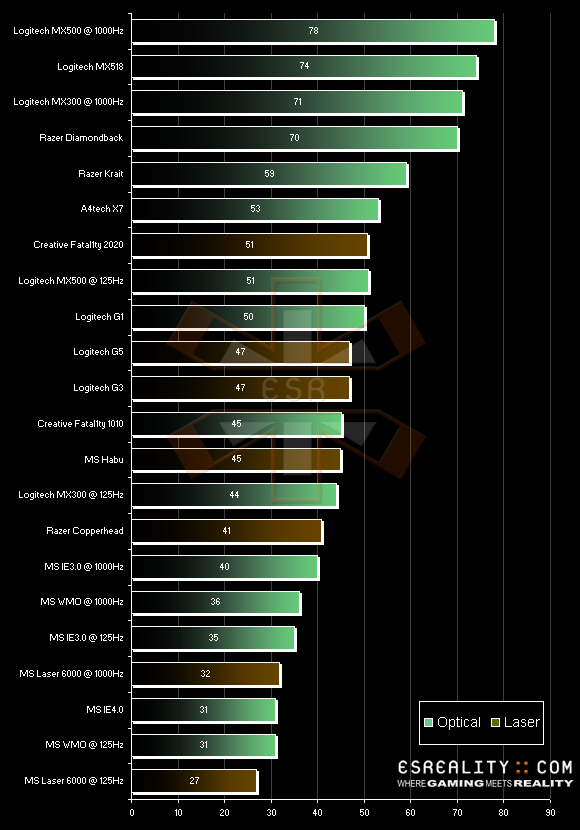
so do the G series of the logitech and any of the razer mouse a smart consumer is a satisfied consumer. specifically http://www.esreality.com/files/placeimages/2006/50190-results_mousescore2007.png i know nothing about keyboards though, i should get a new one. just found out my delete key doesn't work (hence why alot of posts actually end up getting posted by me lately :D) |
|||||||
| #3 03:44am 15/12/06 |
|
|||||||
|
Tanaka Khan
Posts: 3789
Location: Brisbane, Queensland
|
Sorry myWhiteWolf, I know that "report" is dated 11 Dec but they dont even mention the G7, which has been out over 12 months. Bulls*** reporting if you ask me.
|
|||||||
| #4 05:13am 15/12/06 |
|
|||||||
|
dRanged
Posts: 843
Location: Sydney, New South Wales
|
I'm not sure if Honeywell exist anymore, but the original, tiered Honeywell keyboard is imho the best keyboard on the planet. A computer nut friend of mine has a Dell 24" plus other 'Psycho' grade hardware and what Keyboard does he use? His old Honeywell, 15 years old and counting. I still have a spare packed away for a rainy day. :)
|
|||||||
| #5 07:43am 15/12/06 |
|
|||||||
|
Spook
Posts: 17344
Location: Brisbane, Queensland
|
i picked up the most basic logitech cordless keyboard and mouse from office works the other dasy (hi mongie)
works fine $74 (was marked $100) last edited by Spook at 08:55:45 15/Dec/06 |
|||||||
| #6 08:55am 15/12/06 |
|
|||||||
|
HeardY
Gaelic newb
Posts: 13927
Location: Ireland
|
<3 my mx500 :D
|
|||||||
| #7 08:47am 15/12/06 |
|
|||||||
|
rubba-chikin
Posts: 5041
Location: Brisbane, Queensland
|
I own a G7 and have recommended it to a few mates, all of which have been very happy with the gaming performance including me.
Logitech have also released the G11 keyboard which is the same as the G15 minus the LCD panel for those who think its a wee bit wanky and would rather save a bit of dosh and go without. Latest laser mouse I have seen come through work is: http://computeralliance.com.au/parts.aspx?qryPart=7297 Looks pretty funky, like a G7 in a new shell. Haven't tried it out so I couldn't tell you how it rates in feel etc. The G7 and G11 would definately make a nice combo IMO. |
|||||||
| #8 09:35am 15/12/06 |
|
|||||||
|
Tung
Token Black Man
Posts: 4529
Location: Brisbane, Queensland
|
ive got the G7 and the G15, f***ing love it
200 bucks for both from MSY |
|||||||
| #9 09:36am 15/12/06 |
|
|||||||
|
dafugg
Posts: 1320
Location: Brisbane, Queensland
|
that value for the copperhead is .. well.. it's just completely retarded.
I'm using one now and it blows away the g5 I traded it for. |
|||||||
| #10 10:08am 15/12/06 |
|
|||||||
|
trog
AGN Admin
Posts: 19809
Location: Brisbane, Queensland
|
MX500 ftw!
Also, I just bought a couple of Microsoft Digital Media Pro keyboards for work and home. They're pretty good; don't feel as good as the old trusty Honeywell Spacemates (man I miss them). All the extra buttons are sort of handy but I always forget they're there. |
|||||||
| #11 10:45am 15/12/06 |
|
|||||||
|
Tanaka Khan
Posts: 3790
Location: Brisbane, Queensland
|
rubba, I was about to purchase one of those (Logitech MX Revolution Cordless Laser Mouse) from down at C.A., but koopz steered me clear of it as its not a true gaming mouse, and the batteries are apparently not hot swappable.
|
|||||||
| #12 10:46am 15/12/06 |
|
|||||||
|
Alt_F4
Posts: 97
Location: Brisbane, Queensland
|
I've had an MX500 and some Windows Media Keyboard for ~3 years now, but I'm also looking to upgrade both to wireless.
Probably going to go for the Logitech MX3000 set, $110 at Umart. |
|||||||
| #13 11:02am 15/12/06 |
|
|||||||
|
Tung
Token Black Man
Posts: 4535
Location: Brisbane, Queensland
|
alt_F4, spend the extra 90 bucks and get a g7 + g15. i have not had such a good keyboard/mouse combination since my old logitech mouseman+ and my old logi keyboard
|
|||||||
| #14 11:31am 15/12/06 |
|
|||||||
|
Alt_F4
Posts: 98
Location: Brisbane, Queensland
|
I'm tempted to, but I don't game very often or seriously so a lot of the functionality would be going to waste.
Also i want both the mice and keyboard to be wireless so i can use them in bed. Lol. |
|||||||
| #15 11:40am 15/12/06 |
|
|||||||
|
Reverend Evil
Posts: 14271
Location: Wynnum, Queensland
|
What are you gonna do with them in bed? You're sicker than I thought.
|
|||||||
| #16 11:43am 15/12/06 |
|
|||||||
|
TicMan
Posts: 1357
Location: Brisbane, Queensland
|
G15 is the shizzit - it's good to see the Vent/TS info on the LCD so you know who's yapping in your ear.
|
|||||||
| #17 12:05pm 15/12/06 |
|
|||||||
|
Psycho!
Posts: 5781
Location: Brisbane, Queensland
|
thanks all, leaning towards the G11/G7 combo. Will suit my needs. cheers.
And yes, I do remember those Honeywell keyboards as being awesome. |
|||||||
| #18 12:29pm 15/12/06 |
|
|||||||
|
Alt_F4
Posts: 99
Location: Brisbane, Queensland
|
What are you gonna do with them in bed? You're sicker than I thought. MSN, Control stuff when watching TV/DVDs/miscellaneous .AVI files, you know, the usual. |
|||||||
| #19 12:56pm 15/12/06 |
|
|||||||
|
demon
Posts: 2546
Location: Brisbane, Queensland
|
aren't laser mice the same as optical? on whitewolf's posted graph it seems to be saying they are different which makes me feel the need for pedantry. coz surely a device using a laser to sample movement is an optical device.
|
|||||||
| #20 01:04pm 15/12/06 |
|
|||||||
|
Alt_F4
Posts: 101
Location: Brisbane, Queensland
|
All i know is optical mice use a LED and Laser mice use an infrared laser
|
|||||||
| #21 01:10pm 15/12/06 |
|
|||||||
|
Psycho!
Posts: 5786
Location: Brisbane, Queensland
|
yes, picked up the G7 & G11 today and very impressed so far. Also picked up a rather nice ChiMei 19" LCD for the son and its a nice monitor . widescreen, 5ms response time, great image on it and only about $336!
I was going to avoid it because the ones I had checked out on the Surpass site had them at 8ms, but when i went into collect the keyboard and mouse, they had a new shipment in of newer 19" jobbies with a response of 5ms and less than a 17" Viewsonic I was going to buy him. |
|||||||
| #22 06:23pm 16/12/06 |
|
|||||||
|
koopz
Posts: 6009
Location: Queensland
|
a smart consumer is a satisfied consumer. godaamn that was some food for thought... I remember overclocking over PS2 ports for better performance in Q2/Q3, but I didn't know you should overclock your USB2 port to you the edge in 3D gaming... kinda figures I suppose when you think about it |
|||||||
| #23 12:31am 17/12/06 |
|
|||||||
|
rubba-chikin
Posts: 5044
Location: Brisbane, Queensland
|
rubba, I was about to purchase one of those (Logitech MX Revolution Cordless Laser Mouse) from down at C.A., but koopz steered me clear of it as its not a true gaming mouse, and the batteries are apparently not hot swappable. That I was not aware of, never seen one out of the packaging. After looking at a review I see that you are correct about the charging station :/ So in that case a G7 would def be a better choice for gaming by far :) |
|||||||
| #24 01:31am 17/12/06 |
|
|||||||
|
infi
Posts: 4804
Location: Brisbane, Queensland
|
razer copperhead ftw
|
|||||||
| #25 01:55am 17/12/06 |
|
|||||||
|
evıs
Posts: 5800
Location: Brisbane, Queensland
|
G7 and G15 here too, winning combo
|
|||||||
| #26 06:04am 17/12/06 |
|
|||||||
|
dice
Posts: 1697
Location: Gold Coast, Queensland
|
I've spent a fair bit on mice and all that lately ... best i've found now:
Keyboard: Microsoft Digital Media Pro Keyboard Link: Amazon Cost: $60 from Office Works Advantages: Standard keyboard with soft touch keys and various extra keys for msn, mail, 5 x programmable favourites and so on. Disadvantages: Doesn't have too many extra features, but not a problem if you're into simplicity. Mouse: Razer ProSolutions Click V1.6 Link: ProSolutions Cost: $65 if you order with Umart Online Advantages: Has never skipped, completely and perfectly responsive, has extremely smooth feet and feels great on a lot of surfaces. Disadvantages: Just one, because it's built for both left and right handed people, the buttons on the rail will get in the way of your little finger. I've had to put blu tack with a bit of paper over it to stop the buttom from continually clicking in as I play. Extra note: This mouse is pretty much exactly the same as the Razer Diamondback, except that it is made a little better, the buttons feel more solid and less flimsy. Mouse Pad: 1. Razer Mantis Mouse Mat Control Version Link: Umart Online Note: My first choice by far, it's bigger than the keyboard in length and twice the height. Although it doesn't feel as smooth as some others I have used, it actually functions extremely well when attempting tight shots, while still allowing you to play aggressive. 2. SteelPad 5L Professional Gaming Mouse Mat Link: Umart Online Note: This pad is the smoothest I have ever used, but it controls your movements a little too much at times. That said, when I was used to the pad, I was actually playing the best I have ever played. The thing it doesn't have is the size of the Mantis Mouse Mat, and although it still has a good size, I find I still fear a little that my mouse is going to hit the edge, while when using the Mantis that fear is never there. Extra Note: both these pads are extremely soft and feel great when you're using low sensitivity and needing to pick up the mouse continually. The Steel Pad is a little harder, but it's smoother, so it really depends on what you're after. My set up in short costs: Razer Pro Mouse: $65 Razer Mantis Mat: $40 MS Keyboard: $60 Total: $165, and practically perfect. Oh and I have a Razer Copperhead, but it is faulty, so I don't know if it's actually a better mouse or not. It's a little bigger though, so if your hand has more size to it, it's probably the better choice (hoping that it's just my Copperhead that can't track properly and continually sends functions that it shouldn't which cause me to keep walking forward or firing when I'm not even touching it). Hah, damn it, forgot one more thing: The razer mice took me about 2 to 3 weeks to really get comfortable with. At first I absolutely hated them and thought I could never get used to them, but now that I am, I refuse to switch back to anything else. My aim has never been so good. last edited by dice at 14:51:15 17/Dec/06 |
|||||||
| #27 02:51pm 17/12/06 |
|
|||||||
|
system
|
--
|
|||||||
| #27 |
|
|||||||
|
| ||||||||