|
 |
|
 |
|
| Author |
|
|||||||
|
Stez
Posts: 3178
Location: Brisbane, Queensland
|
Sup.
Just got my new system but I can't get the onboard (realtek) sound to work. All the drivers are installed and apparently working fine, but I just can't get any sound out of the speakers. The speakers have been tested on another pc and are fine. In the sound management connection tester it can see the speakers connected but I'm still not getting sound. I've got the latest drivers. Onboard sound is enabled in BIOS. Any ideas? I did a google search and found a few people have had a similar problem but I haven't been able to find a fix that worked for me. |
|||||||
| #0 01:38pm 26/03/06 |
|
|||||||
|
system
|
--
|
|||||||
| #0 |
|
|||||||
|
whoop
Posts: 9874
Location: Brisbane, Queensland
|
I once had no sound from my speakers, in my volume control there's a setup wizard that lets you set up the speakers/mic/aux plugs. I had to run that s*** before sound would come out of anything. I have some soundmax thing though so not sure if yours has anything similar.
edit: I have a completely different motherboard btw, but it's something to try last edited by whoop at 13:41:26 26/Mar/06 |
|||||||
| #1 01:41pm 26/03/06 |
|
|||||||
|
Stez
Posts: 3179
Location: Brisbane, Queensland
|
I've gone through every software option there is, everything appears fine, there's just no sound coming out. I'll have to check the jumpers/cables i think.
|
|||||||
| #2 01:52pm 26/03/06 |
|
|||||||
|
rubba-chikin
Posts: 4716
Location: Brisbane, Queensland
|
Check the front audio header on the motherboard, the pins should look something like this
:::.: If you are not using a front audio panel (a cable plugged onto those pins for sound to the front of your case) then it needs to have 2 jumpers on it or it will not function. So it should look something like the below, the [] obviously being thejumpers O.o ::[].[] Would have to the most common no sound problem I see at work. |
|||||||
| #3 04:45pm 26/03/06 |
|
|||||||
|
reso
I can't read
Posts: 3854
Location: Brisbane, Queensland
|
check it's plugged in to the right one?
|
|||||||
| #4 04:53pm 26/03/06 |
|
|||||||
|
Stez
Posts: 3180
Location: Brisbane, Queensland
|
Thanks rubb chicken, i think ur right it has something to do with how the jumpers are done.
My bro is coming round this evening to check them out (im a hardware noob) so ill let u know of the outcome. At least i've updated all the firmware and drivers on absolutely everything so the computer is running sweetly apart from no sound :) Just this one last task. |
|||||||
| #5 05:00pm 26/03/06 |
|
|||||||
|
Spook
Posts: 15933
Location: Brisbane, Queensland
|
rtm?
|
|||||||
| #6 05:00pm 26/03/06 |
|
|||||||
|
rubba-chikin
Posts: 4717
Location: Brisbane, Queensland
|
It is honestly the easiest thing to do...
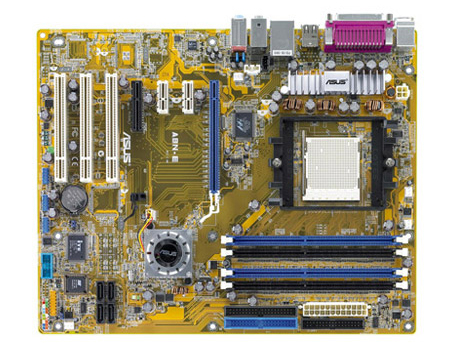
I cant actually find an A8NE M board, there is however an A8NE-FM board which I guess may be it. http://www.okcomputers.cz/foto/F3/MBA6129.jpg The audio jumpers you want are in the very top left of that picture, or bottom left on the actual board itself when you are looking at it mounted the correct way in a case. On the A8N-E board the jumpers for the audio are directly behind the audio ports as far as I can see. http://www.shoprbc.com/images/products/Products/a8ne.jpg The only problem I can see you with is not having any jumpers to stick on there :) If you got any old dead HDD's or mobos lying around just steal them off that. Orrrr check the lil screw baggie you get with the mobo, if you are lucky they may have included spares. |
|||||||
| #7 08:27pm 26/03/06 |
|
|||||||
|
Stez
Posts: 3183
Location: Brisbane, Queensland
|
Hey rubber u were completely right - didn't have the stopped on the point things.
Also, unfortunately this friggin m/board only supports 1 outlet so I won't be able to use the front outlet. thanks heaps for your help |
|||||||
| #8 10:08pm 26/03/06 |
|
|||||||
|
rubba-chikin
Posts: 4718
Location: Brisbane, Queensland
|
What do ya mean it only supports one?
If it has a front panel audio header it should work with a cable plugged into it. If it doesn't the front panel audio jacks could be busted. Basically the way it works is a loopback idea, so the sound signal goes from one pin on the header through the cable to the front jack, then comes back to the pin next to it and to the rear jack. Thats why it won't work with the jumpers off, cause no signal is getting to the rear jacks. So in short if any part of the front panel audio setup has a faulty connection then no sound for you! |
|||||||
| #9 09:23am 27/03/06 |
|
|||||||
|
system
|
--
|
|||||||
| #9 |
|
|||||||
|
| ||||||||